
Better xCloud Linux version is built to deliver a smoother, more customizable Xbox Cloud Gaming experience on Linux. It works seamlessly in modern browsers, giving you better performance, improved controls, and more flexibility while playing on your favorite distro.
How To Download Better xCloud Linux Version
Let’s learn how to use this tool on a Linux desktop, laptop, or phone easily,
- Install the Tampermonkey extension from the Chrome Web Store.
Important Note: You may need to enable Developer Mode (open Chrome > three-dot menu in the top-right corner > Extensions → Manage Extensions > toggle Developer mode) in your browser for Tampermonkey to function correctly.
- Install the Better xCloud Script.
- Visit xbox.com/play
Click the new button located next to your profile picture to configure the settings.
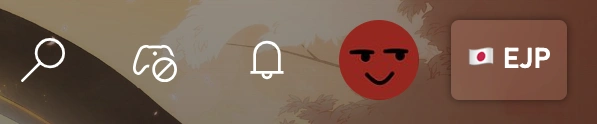
That’s all.
You can also use it on Windows, Mac, Android TV, and more.
Better xCloud Linux Features
In particular, when you use this version on a Linux system (e.g., Ubuntu, Fedora, SteamOS/Deck, etc.), it brings a lot of great features and improvements. And for your convenience, I have already listed some of the features of this tool below for you.
By the way, let’s get to know them now.
- Enables streaming at 1080p resolution
- Creates codec profiles supported by networks and browsers
- Uses changes to make cloud streams look clearer and sharper
- Enables playing xCloud games with a mouse and keyboard
- Improve visual feedback and customization for controllers
- Hide system menu icons and social/chat features
- See estimated queue time and connection status directly on game cards
- Simplify the cloud gaming interface for smoother performance
Apart from these, you will enjoy many more features.
Supported Devices
The tool is mainly designed to enhance Xbox Cloud Gaming on a wide range of devices, especially those running the Linux operating system. And remember, it has no native Linux app and works seamlessly on Linux devices through modern browsers.
Supported devices include,
- Linux PCs and Laptops: Works on Ubuntu, Fedora, Debian, Arch, etc.
- Chromebooks with Linux Support: Can run the browser version.
- Handheld Linux Devices: Steam Deck and other Linux-based gaming handhelds can access it for improved cloud gaming.
- Hybrid Devices: Touchscreen laptops or 2-in-1 devices running Linux benefit from custom touch layouts.
- Controllers and Input Devices: Fully compatible with Xbox controllers, PlayStation controllers, and most USB/Bluetooth gamepads.
Note that, it is a browser-based tool.
Conclusion
Better xCloud Linux version brings a powerful upgrade to Xbox Cloud Gaming for Linux PC, Steam Deck, or hybrid device users. By enhancing graphics, controls, and the overall interface, it turns your browser into a smooth, high-quality gaming platform.
Use it and enjoy more.