
Better xCloud Android TV version (also available for Amazon Fire TV and Meta Quest VR Headsets) is designed to improve the gaming experience with better performance, flexible settings, and controls, making cloud gaming more comfortable and enjoyable on TV.
How To Download Better xCloud For Android TV
Let’s learn how to use it on Android TVs,
- Download Better xCloud APK and install it on your Android TV.
- Sign in to your account.
- Tap the new <SERVER NAME> button next to your profile picture to customize settings.
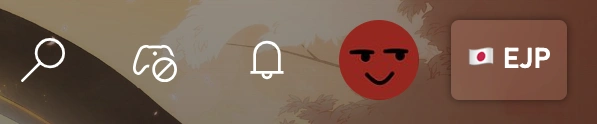
Now, use this app on your Android TV or LG TV and enjoy more.
That’s it.
How To Tweak Android WebView For Better Performance
Let’s learn how to tweak Android WebView for better performance,
- Download and install the Android APK file on your TV.
- Open the Better xCloud app and navigate to the App Settings section.
- Enable Optimize WebView performance setting.
- Go to WebView Manager > Downloader, and install Thorium WebView or Mulch WebView.
- Once the installation is complete, return to the Installed tab, click Refresh, and choose the newly installed WebView.
- Exit the Settings page, completely close the Better xCloud app, and then launch it again.
- Set script’s settings,
Disable xCloud analytics: Enable
User-Agent: Android TV
Save and reload it.
You can now play any game and see the result.
If it still doesn’t work:
- Go to Stream settings and switch the video renderer to WebGL2.
- Try to use the Android Browser on your TV.
- Upgrade to a better device.
That’s all.
Better xCloud Android TV Features
It delivers a more powerful, customizable cloud gaming experience on your big screen, I mean, television. It enhances streaming quality, improves performance, and gives you greater control over gameplay settings compared to the standard browser version.
Let’s see the features now,
- Full-screen cloud gaming designed for large displays
- Clean, TV-friendly interface for easy navigation
- Remote and controller-friendly layout
- Higher bitrate support for sharper visuals
- Reduced latency for smoother gameplay
- Custom resolution and stream quality options
- Compatible with Xbox Wireless Controller
- Supports PlayStation and third-party Bluetooth controllers
- Custom button mapping options
- Vibration/rumble support (when supported by device)
- Faster loading times compared to standard browser streaming
- Better stability during long gaming sessions
- Optimized decoding for smoother frame rates
- Manually select the preferred server region
- Lower ping for improved responsiveness
- Force specific resolution settings
- Enable performance-focused modes
- Works alongside your official Xbox account
- Does not modify your Xbox profile or subscription
There are also many more features that you can enjoy.
Conclusion
Better xCloud Android TV version is an excellent choice for gamers who want to elevate gaming experience on the big screen. With enhanced streaming quality, advanced customization, and improved performance, it delivers responsive gameplay compared to the standard setup.
Use it and turn your Android TV into a powerful cloud gaming hub.